Thursday, 7 January 2016

CalendarPro for Google 2.1 | Add Events with Shortcut (ctlr cmd N)


Idea2Inspire is excited to announce the release of a new update for CalendarPro for Google in the Mac App Store. It is one of the most popular Google Calendar Client app for Mac. It lets users to have access to Google Calendar inside an Mac Application layout which is fast, reliable and easy. Users will have a better experience with Google Calendar by using CalendarPro for Google. 

Bug Fixes:
  • Now it's running on OS X 10.6, 10.7 and 10.8.
  • App Hotkey is fixed
What's new:
  • New Keyboard shortcuts added
  1. Quick Add - SHIFT CMD N
  2. Search Calendar - SHIFT CMD F
  3. Go fullscreen - CTRL F
  4. Print Calendar - CMD P
  5. Reload Calendar - CMD R
  • Now toggle between google accounts with keyboard shortcuts.
  1. CMD 0 for the first account linked to the app
  2. CMD 1 for the second account linked to the app
  3. CMD 2 for the third account linked to the app
  4. CMD 3 for the fourth account and so forth up to 9
  • Badge on dock icon showing the number of events is left on a day.
  • Hide Dock icon without closing the app.

Take a look at this YouTube Video that demonstrates how to add event using keyboard shortcut (ctrl cmd N)


CalendarPro for Google is the easiest way one can have access to Google Calendar in Mac other than web browsers. Download CalendarPro for Google today and schedule your day effortlessly.

Folow us on Twitter:

Monday, 12 October 2015

3DWeather Got A Nice Update in the Mac App Store!


3DWeather recently got update in the Mac App Store by Idea2Inspire. This update added 7 brand new animated themes and an improved icon into the app. The ability to hide dock icon or replace it with the current weather icon with temperature as badge is also added. It has been suggested by a lot of users.

3DWeather was reviewed by Beautiful Pixels and Waerfa in great detail. Get a true insight about 3DWeather in the reviews and find out what they have to say about the app.

We are at Idea2Inspire also feeling very excited with the over all response from the users that we are getting from all over the world. The developers are indicating that the next update is going to be more optimised and CPU friendly.

You can follow us on Twitter or Like us on Facebook to keep yourself updated with all the latest happening.

If you have not downloaded 3DWeather yet, you are missing out of something very special. Also please share 3DWeather with friends, family and colleagues. Basically anyone who is looking for a darn cool weather app for Mac.

Wednesday, 23 September 2015

3DWeather | A beautiful weather app for Mac


Idea2Inspire is excited to announce the release of their new Mac Application, 3DWeather. This is a delightful weather app that delivers weather forecasts in a unique way. Depending upon the weather condition, it prepares 3D animated atmospheric scenes in a small widget with basic climate status. It has introduced a new approach to displaying weather forecast which is both informative and delightful to look at.


Lots of themes to choose from:
The app will never get monotonous and look old to you, because, like seasons, it will change it’s look with the passing of time. 3DWeather comes packed with three themes featuring different scenes, places and atmosphere. You can change them very easily from the Locations under preferences.

Limitless customization:
3DWeather lets you customize it to such extent that it will become your very own personal weather assistant.

Precise and detailed weather information:
3DWeather get it’s weather forecast from Weather Underground which is the most accurate and detailed forecast provider available presently.

Notification:
Did we mention that you will get live weather alert right into your Notification Panel? Yes! this is true. You will get timely Notification automatically about the recent updates and developments on weather into your Notification panel in certain time intervals throughout the day.


Head over to App Store today and download 3DWeather for your Mac. Don't just read out weather statistics but also visualise your weather condition. Know more about 3DWeather in our website. Got a question? contact us at info@idea2inspire.com

Make sure to follow us on Twitter

Wednesday, 29 April 2015

Gdrive for Google Drive - The Easiest Way to Access Google Drive Is Here!


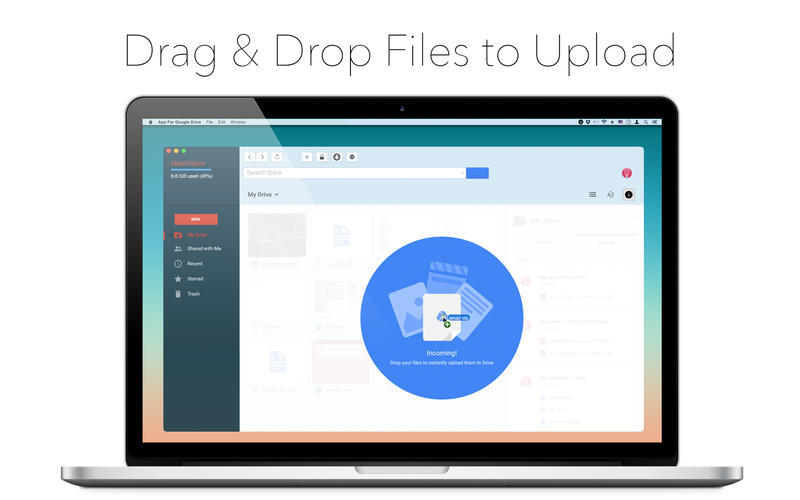
Idea2Inspire is proud to announce Gdrive for Google Drive, a Mac Application for managing Google Drive files in an easy manner. Gdrive for Google Drive is the easiest way to use Google Drive that reduces your effort and saves time. Gdrive for Google Drive allows users to upload and download files from the app without the help of a web browser.

App Highlights:
  • Just drag and drop files into the app interface to upload files
  • Bring app window from the Status Bar icon in case the Dock icon is hidden
  • Open the app at login
  • Set up a hot key as a keyboard shortcut to open the app faster
  • Open multiple app window for the same Google account
  • Make the app interface transparent when inactive


Get started with Gdrive for Google Drive, and have all your files within reach from any smartphone, tablet, or computer. All your files in Google Drive - such as your videos, photos, and documents - are all backed up safely so you can't lose them. Easily invite others to view, edit, or leave comments on any of your files or folders.

Drive for Google Drive is the easiest way to use Google Drive that reduces your effort and saves time. Download it today and access your Google Drive more conveniently. 

Don't forget to Follow us on Twitter:

Monday, 20 April 2015

Desktop Bible Lite - Free Offline Bible Application for Mac!


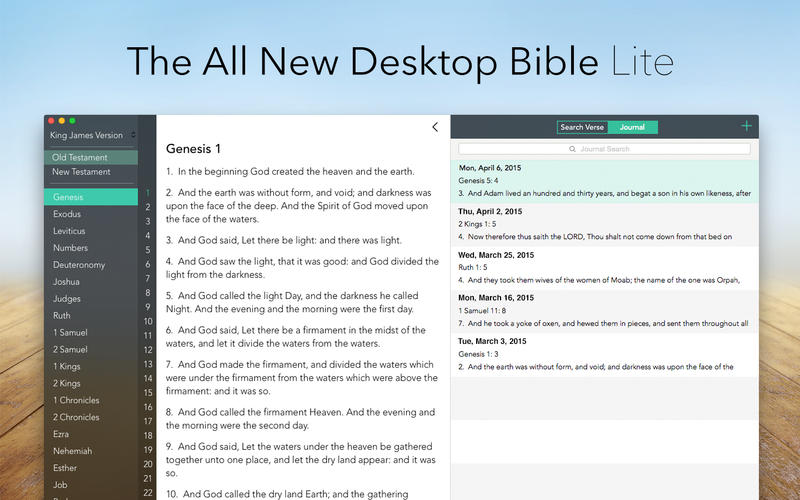
Idea2Inspire announces the release of their new free Mac Application, Desktop Bible Lite, in the Mac App Store. This is the free edition of the very popular Desktop Bible that has been everyone's favorite since its release. The reason behind releasing a free version of Desktop Bible is to reach out to more users. Desktop Bible Lite offers everything from the paid version except 48 Bible Versions. It has King James Version by default. One can always upgrade to the paid version to avail up to 48 Bible Versions that consist of Bible Versions from different languages. 

App Highlights: 
  • Easy-to-navigate user interface.
  • Option for Simplified Verses
  • Mark Bible verses as Favorite.
  • Browse Favorite verses in one place.
  • Make personal journal and include Bible verses.
  • Search for Bible verses through the whole app.
  • Share scripture in social medias like Twitter.

Desktop Bible Lite will help users to dive into the Sacred Scriptures without all the clutter of Internet. The app interface is smartly divided and categorized into different sections, which make it a lot easier to navigate through the app. One can always resize the app layout for comfortable viewing. Download Desktop Bible Lite for free in the Mac App Store today.


Monday, 6 April 2015

Notes for Google Keep - Capture Your Thoughts on Google Keep Through this Mac Application!


This Mac Application will allow users to work on Google Keep on a minimalist app layout. Quickly capture your thoughts with pictures into colorful palettes on your Mac. Notes for Google Keep is the easiest way to access Google Keep notes on your Mac and do every bit of it.

Advantages of using Notes for Google Keep:
  • Open app at Login.
  • Display Notes on Desktop.
  • Add notes quickly from Status Bar icon.
  • Make app transparent when inactive.
  • Hot Key to open app faster.

Notes for Google Keep has the ability to give users direct access to Google Keep on top of Desktop, on a transparent scrollable layout. It can be dragged and put on anywhere on the Desktop as per convenience. It also can be accessed from the Status Bar icon incase one needs to take notes even more quickly. This app is entirely designed for Yosemite, hence two different themes are there for this app to set depending on the Desktop wallpaper.

Get all the notes synced instantly on the Google Cloud and access them from anywhere. Get Keep for Google Keep today and have Google Keep notes at your finger tip at anytime on your Mac.

Follow us on Twitter:


Thursday, 2 April 2015

Hello there. We are Idea2Inspire!

Hello there. We are Idea2Inspire.

Like us on Facebook
Email for Gmail is simply the best #Gmail Client for #Yosemite!Currently available in the Mac #AppStore Get it here: https://itunes.apple.com/us/app/email-for-gmail/id952233128?mt=12
Posted by Idea2Inspire on Thursday, April 2, 2015

Follow us on Twitter
Add us on Google+


Subscribe to us on Youtube


Follow us on Tumblr
http://idea2inspire.tumblr.com/post/115023131569/new-gmail-client-for-mac-os-x-10-10-yosemite