Tuesday, 22 July 2014

Live VideoWall – Exclusive Live Wallpapers for Mac from Idea2Inspire!


Idea2inspire released an app called Live VideoWall in the Mac App Store in the category of Entertainment. Live VideoWall is a Mac Application that comes with an ultimate collection of live wallpapers for Mac. The application showcases some of the finest live wallpapers, which will redefine your Mac's desktop screen. 


Key Features:

  • Beautiful looking Live Wallpapers all in one place.
  • Preview Live Wallpapers before using it.
  • Set Live Wallpapers directly from the app.
  • Mark Live Wallpapers as favorites.
  • Easy to launch and open Live Wallpapers.
  • A vast number of Live Wallpapers.
  • Easy-to-use app interface.


It will surely enhance the way a Mac desktop screen looks. Live VideoWall is definitely going to be everyone's favorite Live Wallpaper app in the App Store. Idea2inspire really hopes that, people will like it very much. So, get it today and enjoy these breath taking Live Wallpapers.

It provides a variety of themes, which has different layouts and distinctive styles. There are a vast variety of videos and it's really unique in it's own way. All the video wallpapers are created by professionals with a creative mindset.

So, download Live VideoWall for your Mac and get rid of the boring static wallpapers. Redefine your Mac desktop screen with this app and stay amazed.

Tuesday, 15 July 2014

My Days is now free with a liter version of the same app – My Days Lite!


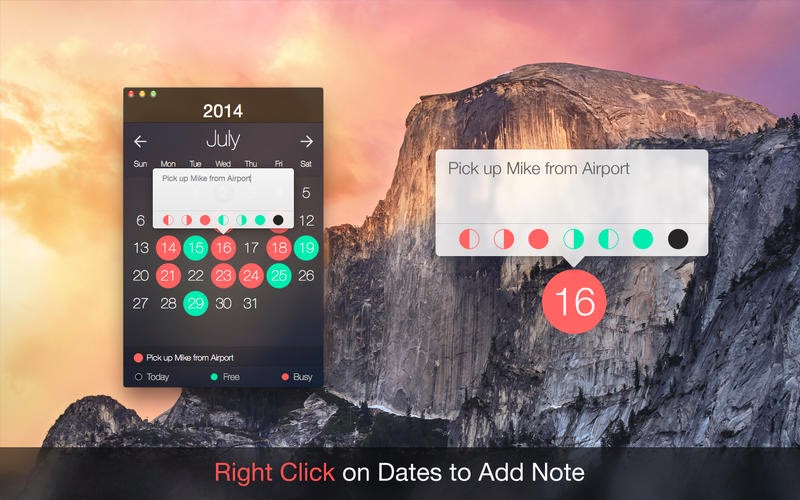
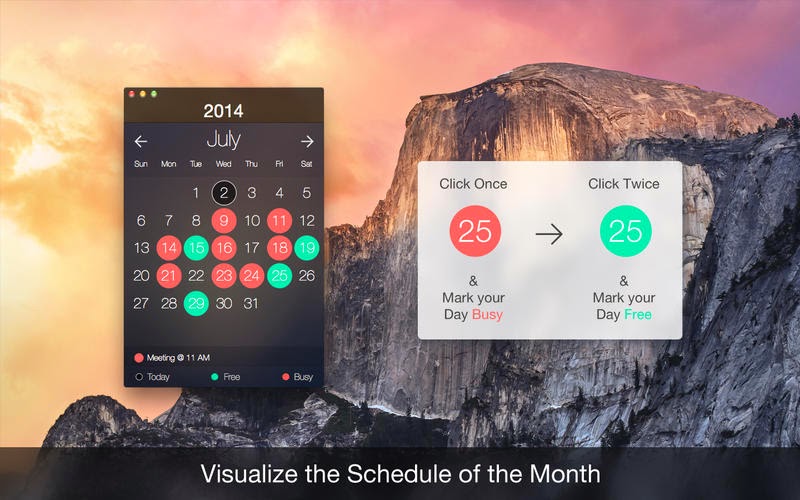
Idea2Inspire is happy to announce that My Days Lite is currently available in the Mac App Store for free. My Days presents a calendar in a beautiful transparent interface where users mark their busy days with short notes. And now it is free. It is for encouraging new users to use it and enjoy the benefits.


Lets have a close look on some of its awesome features:
  • Small transparent interface that consumes less desktop space.
  • User-friendly app with simple inputs.
  • Add notes with a single right click.
  • Hover over dates to see notes quickly.
  • Mark a busy day with a single left click.
  • Mark a free day with double left click.
  • Color code: Red denotes Busy; Green denotes Free.
Tip: On top of the above-mentioned ones, users can avail more features (i.e. iCloud, Themes, First half or Second Half) in the paid version.

My Days could be a necessary tool in everyday life where people fix appointments, plan events etc. My Days will let users know if the proposed day is engaged or not. This app will help users to figure out days to squeeze in extra responsibilities, jobs, events etc. in an already tight scheduled timeline. It makes life easier than one would probably have thought of.

It is already a very popular app in the App Store under Productivity and people have loved it a lot. It is the free version of the app. My Days Lite is currently available in the Mac App Store. Try it and share your experience with us.