Friday, 30 May 2014

Simply Do, An Effective And Easy Way To Manage To Dos, From Idea2Inspire!


Simply Do is an easy way to keep notes and ideas, which you want to execute in future. You can open it and create categories of your choices and write your thoughts in them so that you can make them happen. You can simply add tasks and have a track on all of them. To have a better understanding of your tasks, you can add notes with them very easily. It also comes with the feature where you can mark your tasks that you already have accomplished.


Lets have a look on some of Simply Do’s key features:

-Quick and easy to launch the app
-Easy to create categories and add tasks
-Take notes with tasks
-iCloud syncing
-Mark tasks that are done
-Beautiful and intuitive design
-Multiple sharing options

The best way to learn how to use Simply Do is to try it. This will allow you to back up your notes in iCloud and synchronize them automatically, so that you can take your notes with you where ever you go.  You can share your thoughts and ideas with your friends using a number of sharing options available in this app.


Simply Do is currently available in the Mac App Store in the category of Productivity. So, have it today in your Mac and never forget a task to execute.


Business Letters, Draft Professional Letters With Business Letters In No Time, From Idea2Inspire!


Business Letters is another addition in the Mac App Store in the category of Business from Idea2Inspire.  It’s a necessary resource for everyone. It consists of a variety of pre-written letters, which will fit every occasion of yours where you write letters. This useful application will help you in drafting any letter very quickly. All you have to do is search for the right one by browsing through the categories.  It also has an easy to find browser from where you will reach to your letter of choice in no time. 


Business letters covers the following category:
-A vast catalog of highly professional business letters.
-All the letters are sorted into appropriate categories.
-Letters are very easy to find and edit.
-Simple and easy to operate user interface.

 
Business Letters is an essential tool for your Mac for every reason. Own it today from Mac App Store and get quick results out of it.
 

Thursday, 22 May 2014

Pros Vs Cons, A Brand New Way To Kill Dilemma, From Idea2Inspire!

-->
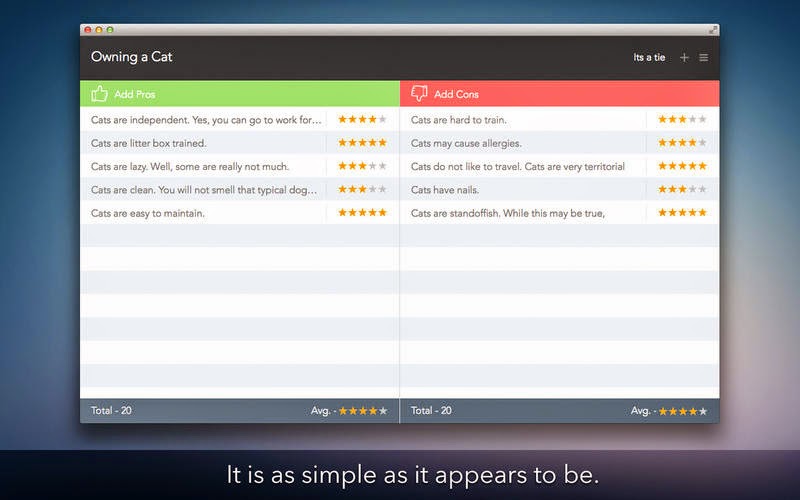
This is a new app in the Mac App Store called Pros Vs Cons from Idea2Inspire. Basically what it does is, it lets you compare and differentiate between things that you are not sure whether you should go for that or not. Once you are done with drafting pros and cons and giving them ratings, it gives you a result based on a logical decoding. In this way you will be able to come to a conclusion very easily.
-->

It has a beautiful design with an excellent user experience. You will be able to type and submit as many points as you can and give them ratings very easily according to their importance. It may turn out to be a very useful app especially when you are facing trouble in decision-making. Lets have a look at some of its key features:

-->
-       Easy to add points and give ratings
-       Instant results
-       Try and save limitless topics 
-       Beautiful UI 

-->

Pros Vs Cons is currently available in the Mac App Store. So, go and have it in your Mac today and share it with your friends.

Tuesday, 29 April 2014

Effortlessly Draft Word Documents with Templates for Microsoft Word. Get it From Mac App Store.


Templates for Microsoft Word is a newly released app in the Mac App Store in the category of Education from Idea2Inspire. It is a collection of 200 pre-designed templates for your Word documents.

It will provide you with professional-quality elements, amazing backgrounds, marvelous fonts and unique layouts, allowing you to completely focus on your document’s content rather than the design. Templates for Microsoft Word is the easiest way to create high quality documents with Word. It gives you all the tools you need to create great-looking documents. You get a wide variety of templates to choose from. You can choose from letters, brochures, letterhead and business proposals. All the templates are professionally designed to meet your needs. The templates are very easy to use and will make the task of creating business document a “piece of cake”.

Creating a gorgeous document with the templates is really simple. Just select the template and replace the placeholders with your own content! All the templates are sorted into categories and come in standard page sizes, so you will be able to find the perfect template for any kind of documents, including flyers, brochures, letters, reports and more. It consists of so many eye-catching brochures, invoices, letters, envelopes, and business cards which will help you in drafting a document very quickly and effortlessly as well.


Most objects in Templates for Microsoft Word can be effortlessly recolored, reshaped, moved, or removed. Type or paste your own text, add or remove text boxes, and change the font if you wish. Drag your photos or pictures onto documents to design a document of your own. Templates are made of many separate elements that can be individually moved, removed, recolored, resized, etc. So every template can be completely adjusted according to the personal preferences. Let’s take a look at some of its key features at a glance

- Lots of categories
- Amazing Templates
- Totally customizable
- Unique Designs
- Saves Time
- Very Handy
- Password Protection

Templates for Microsoft Word is currently available in the Mac App Store. So, go and have it in your Mac today. 


Monday, 28 April 2014

Make Or Receive Calls Right From Your Mac with PhoneCall From Idea2Inspire!


PhoneCall is a new productivity app in the Mac App Store from Idea2Inspire developers. PhoneCall is an app that connects your phone with your Mac via Bluetooth that lets you operate and access all the basic phone call functionalists right from there. After you are done with the "connecting" part, you can make calls; receive calls, view call log and favorites right from your Mac. You can also see your Phone’s signal strength and battery life very easily from the app itself. You will be seeing all these information in a small, minimal user interface which is very easy to configure and use also. This app is compatible with every phone having a Bluetooth version of 3.0 or later. It becomes super easy for you to handle all sorts of activities you would do with your phone while working if you needed to make a call or receive one. Now you can do all of them right from your Mac without even touching your phone. You can dial any number from the dial pad that you will find within this app and make a call.


You might feel very disturbed at times when you get calls in the middle of work. Because, you simply don’t want to shift your focus from your work to your phone. But now by using PhoneCall you can receive calls right from your Mac and talk to your friends without any disturbance. Not only that, you will also experience a clear sound from the other end of the phone. You also have the ability to access Siri in your Mac through this app which makes it handier than any other app of this category. It connects the phone with your Mac very quickly and you will find no difficulty on that sort. New users will have no problem at all with respect to using this app because the user experience has been designed with self explanatory icons. Lets take a look on the key features of this app at a glance:

- Make Calls
- Receive Calls
- View Network and Battery Strength in the app
- Call Log
- Favorites


So, download this app from the Mac App Store today. You will definitely find it very useful and beneficent as well.


Tuesday, 22 April 2014

The Best Currency Conversion App for Mac – Currency Rates From Idea2Inspire!


Currency conversion apps are very useful to people who travel abroad or have something to do with trading currencies. Because, these types of applications are the best way for them to know how they can get the best possible rates. There are also people who like to keep track on the latest updates from stock exchange and see how their currencies are doing. There is tons of apps available in the market but most of them lack the efficiency of using. But Idea2Inspire has developed an app that takes care all of that.

Currency Rates is a newly released app in the Mac App Store from Idea2Inspire that converts any currency very easily. It is small, simple yet effective and gives excellent results. It basically works as a currency converter and gives the most accurate exchange rates. It has a minimal user interface that gives you ease while using this app. You will have no problem with getting started with this application because it is very easy to use and has got the best design for an app of this category. You can simply launch this application from the Menu Bar of your Mac and start using it. It has an integration where you will be able to share the converted rates with your friends across different social networking sites which turns out very useful sometimes. You will find all the major currencies in this app that are easily convertible to other currencies. 


The main goal of this app is giving what users’ need. It serves your purpose possibly the best way by giving a clean and cutter less experience.  If you want an all in one converter that can convert pretty much any currency you want, then get Currency Rates for your Mac. It is available in the Mac App Store for $ 1.99 dollars. So, go to the Mac App Store and check this out today.